
The next generation of educational AI platforms will not be defined only by a single chatbot, tutor, or dashboard. They will be defined by ecosystems.
For AI in education to scale meaningfully, platforms need to support tools created by researchers, educators, developers, and institutions. These tools may include tutoring agents, feedback assistants, reflective learning protocols, assessment helpers, simulation tools, analytics widgets, or curriculum generators.
However, this raises an important question:
How can an educational AI platform allow extensibility without compromising safety, trust, learner privacy, or production stability?
This is the motivation behind the LearnAdapt PedOS Plugin Lifecycle.
PedOS, or the Pedagogical Operating System, is designed as an extensible layer for LearnAdapt. It allows new educational AI plugins to be generated, reviewed, tested, published, and safely deployed into the platform.
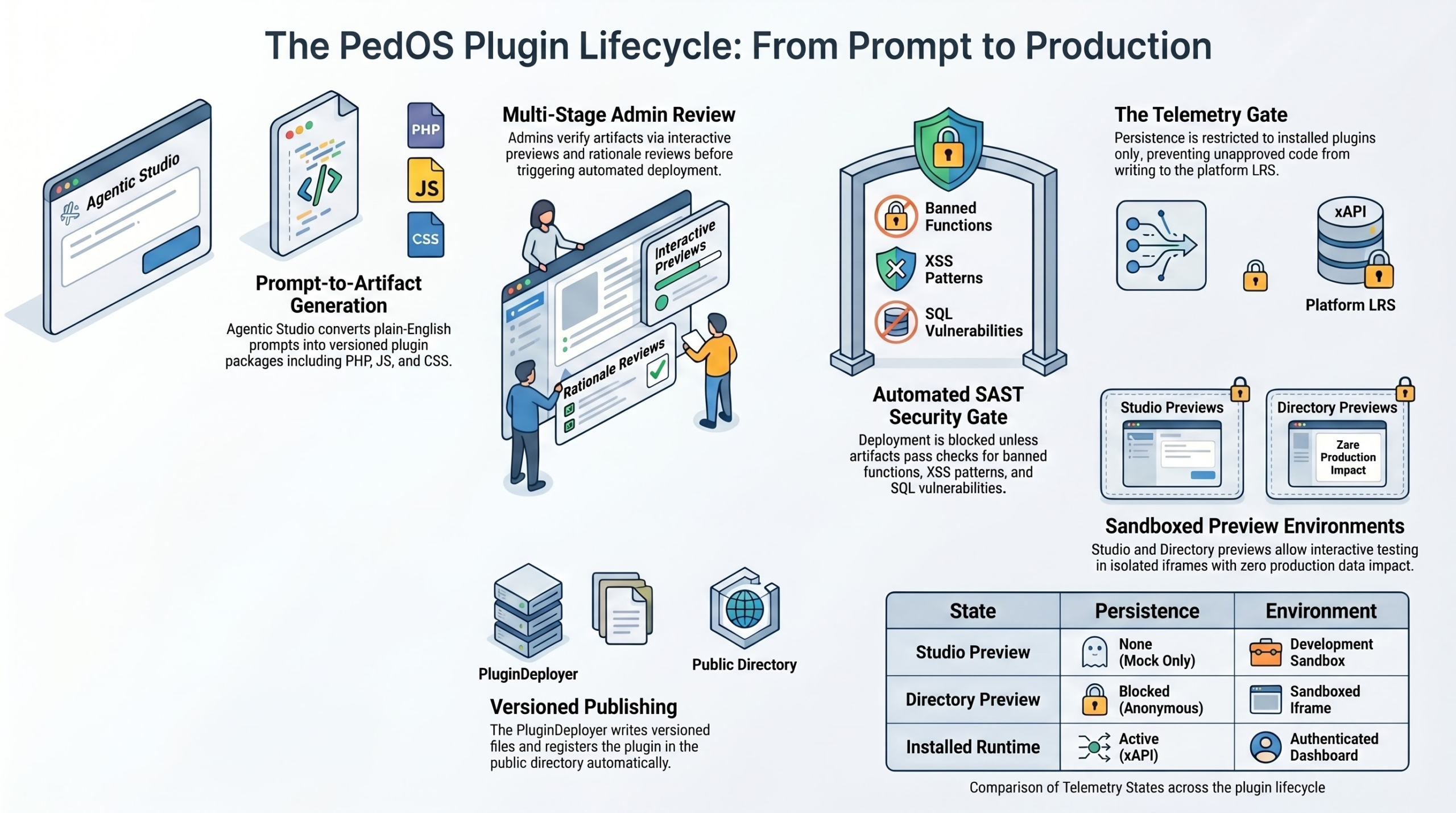
The lifecycle moves plugins from prompt to production through several controlled stages.
1. Prompt-to-Artifact Generation
The process begins in Agentic Studio, where a plain-English prompt can be transformed into a structured plugin package.
Instead of requiring every educator or researcher to write code manually, Agentic Studio can help generate versioned plugin artefacts such as:
• PHP files
• JavaScript files
• CSS files
• Plugin metadata
• User interface components
• Behavioural logic
This means a researcher could describe a reflective learning tool, an educator could define a formative feedback assistant, or a designer could specify an interactive classroom activity — and the system can begin converting that idea into a working plugin package.
But generation alone is not enough.
In education, especially when learner data and institutional trust are involved, every generated artefact must go through review, validation, and controlled deployment.
2. Multi-Stage Admin Review
Before deployment, plugins enter a multi-stage admin review process.
Administrators and authorised reviewers inspect the generated artefacts through interactive previews and rationale reviews. This allows reviewers to understand not only what the plugin does, but also why it behaves in a particular way.
This step is important because educational AI tools should not be treated as black boxes. A plugin that gives feedback, prompts reflection, or influences learner behaviour must be interpretable enough for humans to review.
The admin review stage supports:
• Human inspection of plugin behaviour
• Review of generated artefacts
• Interactive previews
• Rationale-based evaluation
• Deployment approval or rejection
This creates a human-in-the-loop safeguard before automation takes over.
3. Automated SAST Security Gate
After review, plugins pass through an automated SAST Security Gate.
SAST stands for Static Application Security Testing. In simple terms, it means the platform analyses the plugin code before it runs in production.
The security gate checks for issues such as:
• Banned functions
• Cross-site scripting patterns
• SQL vulnerabilities
• Unsafe code behaviour
• Potential injection risks
If a plugin fails these checks, deployment is blocked.
This is crucial because an educational plugin ecosystem cannot rely on trust alone. As the platform becomes more extensible, security must be built into the lifecycle itself.
The goal is not merely to generate plugins quickly, but to deploy them safely.
4. Sandboxed Preview Environments
Before a plugin becomes available in a live learning environment, it can be tested in sandboxed previews.
LearnAdapt separates preview states from production runtime. This allows plugins to be tested without affecting real learner data.
The lifecycle includes different preview and runtime states:
• Studio Preview — mock-only persistence in a development sandbox
• Directory Preview — anonymous preview in a sandboxed iframe
• Installed Runtime — active xAPI persistence inside an authenticated dashboard
This distinction matters because not every plugin interaction should write data to the learning record store.
A plugin being tested in a preview should not pollute production analytics. Only approved, installed plugins should persist real telemetry.
5. The Telemetry Gate
The Telemetry Gate controls when plugin activity is allowed to write to the platform Learning Record Store.
In LearnAdapt, telemetry is not treated as a free-for-all. Persistence is restricted to approved, installed plugins. This prevents unreviewed code from writing learning activity records into the platform LRS.
This is especially important for systems using xAPI or other learning analytics standards.
The telemetry gate protects:
• Learner data integrity
• Analytics reliability
• Institutional trust
• Research validity
• Platform accountability
In research-grade educational AI systems, bad telemetry is not just a technical issue. It can distort learning analytics, affect research conclusions, and reduce confidence in the platform.
6. Versioned Publishing and Public Directory
Once approved, plugins can be published through a versioned deployment process.
The PluginDeployer writes versioned files and registers the plugin into the public directory automatically. This allows approved plugins to be discovered, reused, and adopted by others.
Versioning also makes the ecosystem more accountable. Each plugin can be traced, updated, reviewed, and improved over time.
This supports a future where LearnAdapt can host a growing library of pedagogical tools, including:
• TutorBot extensions
• ScaffoldBot strategies
• Reflective learning protocols
• Assessment tools
• Critique Studio activities
• Simulation-based learning modules
• Learning analytics dashboards
• Discipline-specific educational agents
Why This Matters
Many AI platforms focus on generation.
LearnAdapt PedOS focuses on responsible generation, review, deployment, and learning impact.
In education, this distinction matters. A plugin does not simply perform a technical function. It shapes how learners think, reflect, practise, receive feedback, and make decisions.
That means educational AI plugins need governance.
They need security checks.
They need human review.
They need safe preview environments.
They need controlled telemetry.
They need versioning.
And most importantly, they need to be designed around pedagogy, not just productivity.
Towards a Pedagogical Operating System
The broader vision is to build LearnAdapt as a Pedagogical Operating System for educational AI.
This means creating an ecosystem where researchers, educators, developers, and institutions can co-create AI-powered learning tools in a safe and structured way.
The PedOS plugin lifecycle is one step towards that vision.
It turns plugin creation into a governed pathway:
Prompt → Artefact → Review → Security Gate → Sandbox → Telemetry Gate → Versioned Publishing → Production
This is how we move from isolated AI tools to a trusted educational AI ecosystem.
Invitation to Collaborate
I am currently exploring how LearnAdapt PedOS plugins can support adaptive learning, learning analytics, reflective practice, design critique, AI tutoring, simulation-based learning, and research-grade educational experimentation.
I would be happy to connect with people working in:
• AI in education
• Learning engineering
• LLM agents
• Multi-agent orchestration
• Educational plugin systems
• Learning analytics and xAPI
• Safe AI deployment
• Human-centred EdTech
• Research infrastructure for digital learning
If you are interested in building safer, more extensible, and more pedagogically meaningful AI systems for education, I would love to connect.